 Leave It Clean
History that forgets itself.
Leave It Clean automatically deletes the websites and keywords you choose from your Chrome history — and never shows your rules again, not even to you.
Coming soon to the Chrome Web StoreFree for up to 3 rules. Processed on your device.
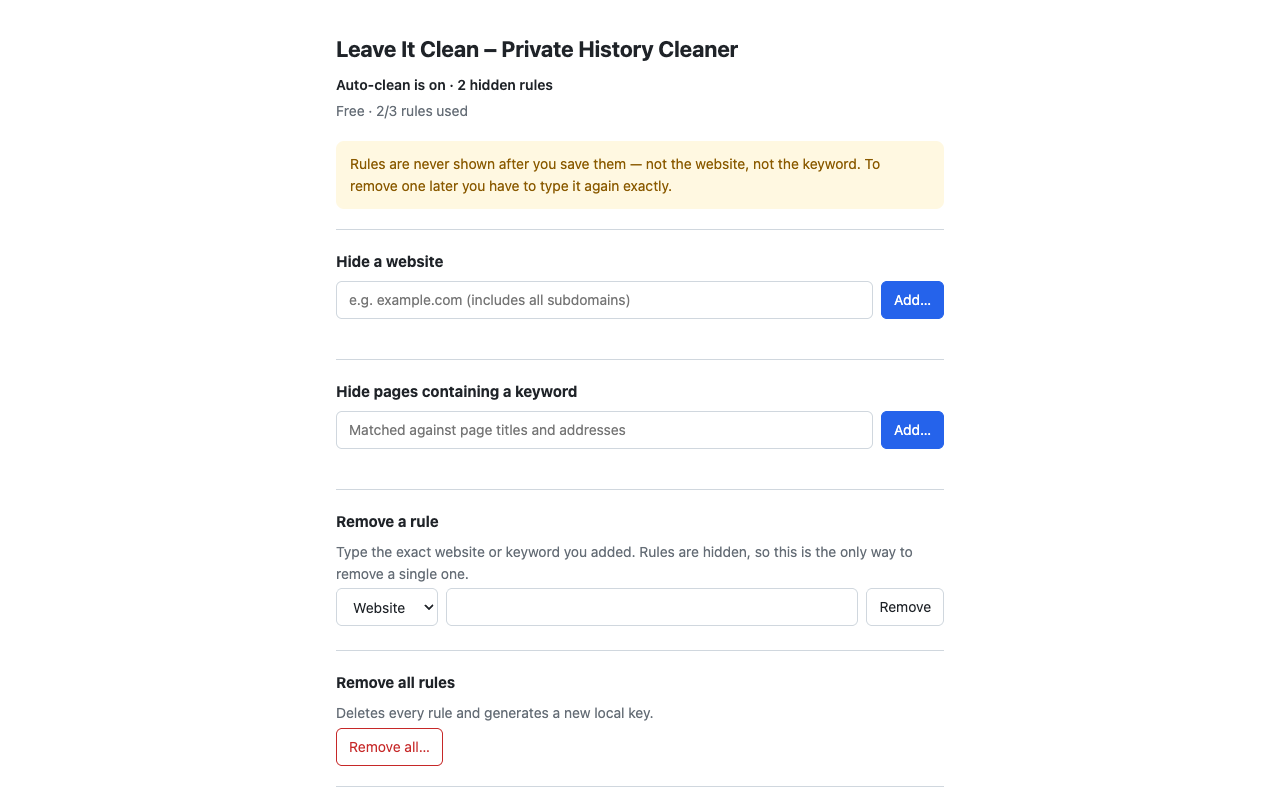
What it does
Website rules
Add example.com and every visit to it and its subdomains is removed from history.
Keyword rules
Pages whose title or address contains your keyword are removed too.
Recently closed
Tabs that visited a hidden site are cleared from “Recently closed” after you close them.
Existing history
Adding a rule also removes matching entries already in your history.
Rules stay hidden
Most history cleaners list your sites in plain text, so the list itself gives you away. Leave It Clean stores each rule only as a keyed hash (HMAC-SHA-256 with a random key created on your device).
After you save a rule, neither the settings page nor the extension’s storage shows the website or keyword. To remove one rule, type it again; or remove all rules at once.
Your data stays on your device
Matching and deletion happen locally in your browser. Your browsing history, page titles and rules are never sent to us or anyone else. No analytics, no tracking. Read the privacy policy.
| history | Detect visits and delete matching history entries. |
| tabs | Read the page title once it loads (for keyword rules) and the current site when you click “Auto-clean this site”. |
| sessions | Find matching entries in Chrome’s “Recently closed” list. |
| storage | Keep the hashed rules on your device. |
Honest limits
- Tabs that are still open.
- Cache, cookies, downloads, bookmarks and autofill data.
- Records kept by websites, your network provider, DNS, or your Google account.
- The brief moment between a visit and its deletion.
- Guessing: anyone using your unlocked browser can test guesses in the “Remove a rule” box.
It is not a replacement for incognito mode, and it cannot protect a device someone else already controls.
Pricing
Free for up to 3 rules. A Pro plan with unlimited rules is coming soon.